
TL/DR: This is a really clever screen-free toy robot, with a lot of play value, and a lot of learning value, and I would recommend it to parents or teachers of 3 to 6 year olds if it’s within your budget (it costs around $120.) If your budget is tight, the Code and Go Robot Mouse is a good option, but it’s nowhere near as versatile as mTiny.
MakeBlock makes a variety of robot learning toys for all ages of children. All are focused on fun, playful ways to learn robotics and coding. MakeBlock offered to give me a robot in exchange for this review. I teach STEM classes and camps for 3 – 6 year olds, so I tested the mTiny, which is labelled as being for ages 4+.
Here’s the introduction video from MakeBlock:
There are lots of different ways to play with this robot. In fact, there are so many different ways to play with it, that I would encourage thinking about introducing one thing at a time and letting your child explore that for a while (a day? a week?) and master it before introducing something new. Doing it this way will enhance the play and learning value since you’re waiting till your child gets “bored” of one thing (which means they’ve mastered it) and are ready for something new.
I’ll break these different functions down one-by-one.
Remote Control Toy
To get started: Turn on remote—press and hold power button on side for 3 seconds. Turn on robot, turn up volume switch on the back. Push the joystick in different directions to drive mTiny around the room. Simple and satisfying toy right there. (And so much better than Sphero robot which failed at working consistently for even this simple basic use and required the use of a phone or tablet rather than being self-contained.)
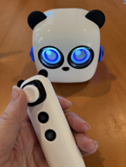


The components are well-designed, work smoothly, are comfortable to hold and look good. Non-toxic materials and the ears are made of food-grade silicone… just in case your kid’s a chewer.
Costumes
mTiny is a super cute panda bear styled robot, with sweet facial expressions and sounds, that really appeals to young children. He also has three costumes, a flag pole and some flags to attach that add a little to the fun. It would likely be easy to make more as a craft challenge.
Piano
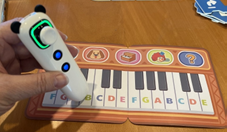
Use the remote to tap on an icon at the top, then tap on the keys to play music. Easy and enjoyable, especially with the barking sounds.
Game Cards
You can have mTiny run a race, or play golf. For the race, you put mTiny on the starting card. Shake remote vertically to go forward, shake with joystick facing up to turn right, joystick down to turn left. Go till you get to finish line. A fun game, reminiscent of Wii Sports.
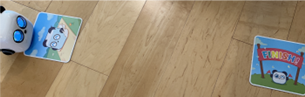
For Golf, put mTiny on golf tee card. Decide where your “hole” is you’re aiming for. Hold on tight to the remote, then swing it like a golf club. How many swings does it take to reach your goal?


Coding Cards
The robot comes with 36 coding cards. (A stiff / plasticy cardboard? They seem fairly durable.) Tap the remote on a blue tile to tell mTiny what direction to move. Tap on a purple tile and mTiny will make a noise, wiggle, and/or his eyes will change. [Note: although everything else about this robot works well and consistently, we found that the facial expressions didn’t seem to work very well.]

Programming mTiny
Start with the yellow tile with the green flag on it. (INPUT) Add a chain of command tiles. Put the green tile with green flag on it last. (GO tile) Tap each of the blocks in order with the remote. Then, either tap the GO tile, or press Start on remote to run the program.
The cards command the robot to go straight, turn, do facial expressions… there are “repeat” cards, which do the previous card twice, and loop cards which run the whole program again.


This part is reminiscent of the board game Robot Turtles in terms of how it teaches key concepts of coding, but may be more fun for some kids than the board game because they have an actual robot that follows the commands instead of moving a game token.
You can play with these coding cards alone at first, just letting the robot run along the floor, then add the storybook later.
Program to Reach a Goal
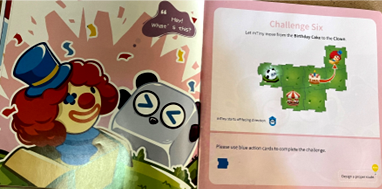
The robot comes with 24 sturdy map pieces and a companion storybook. The storybook has several programming challenges. You set up the required map squares as shown, and the coding cards as shown, set mTiny on the first square, then run the program to help mTiny reach the goal. Each challenge adds new skills, and fades the amount of hints given, so children gain mastery by going through them in order. (Note: in my class, rather than putting out the whole book at once, I scanned and put out just a few challenges at a time so they would work through them sequentially rather than leaping ahead to the end.) This is a fun and engaging way to learn about writing basic programs. (See a video of a sample challenge at https://www.youtube.com/watch?v=xc-I_kxr4LE)
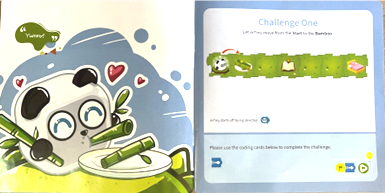
In some ways, the Robot Code and Go mouse is easier for kids to learn, because the buttons are right there on the mouse and you type on its back to tell it to go straight or turn, rather than tapping a remote on a card, but I think this is quite learnable for kids, and mTiny has lots more to offer than the mouse.
The Town Map
On the other side of the storybook map pieces, there is a road map of a town. I truthfully did not play with this at all. But the instructions say you can do things like start mTiny in the police station, which allows him to act like a police officer (his eyes show a badge!) then you design a program to help him catch a thief on the map square with a thief on it.
You can also just free drive the robot around town, I think, and different squares may make different sounds. Again, I haven’t played with it in that depth yet. Apparently the robot has 300 sound effects. (and thankfully a volume dial)
I think this toy potentially offers long-term, multiple-use play value. IF you dole out all the functions one at a time. If you dump all the “watch everything this can do” in one day, it may overwhelm some kids or they will only take advantage of a few of its capabilities. Being intentional in how you use this could make it well worth the purchase price.
Additional Details
No batteries required. It comes with a charging cord that allows you to charge both the robot and the remote from one cable. It is easy to pack everything back into the boxes for easy storage and transport, something I always appreciate.
Here is a get-started guide, and are the tutorials for mTiny. I made my own instruction cards to use in class.
You can purchase a single mTiny on Amazon for around $130. (Amazon affiliate link) Or you can buy a single mTiny from MakeBlock for $119. (MakeBlock affiliate link) Or, you can purchase classroom packs and add-on accessories (such as more maps and coding cards to play musical tones) from MakeBlock. The classroom packs include markers for mTiny to draw with.
I’d recommend it.
Click here for reviews of other robots, or find recommended books about inventors and makers, a STEM gift guide, or hands-on activities to learn about robots.
 Inventors of Tomorrow
[…] The mTiny Robot […]
LikeLike
[…] I reviewed several robots in 2017, on my own quest for a good present for a 6 year old. My favorite for long-term learning was the Learning Resources Code and Go Robot Mouse. (Learning Resources also offers Switcheroo Coding Crew which Purdue recommends, and Coding Critters which might be worth checking out.) In 2023, I’ve tested the mTiny robot from MakeBlock, and like it even more. (Full review here.) […]
LikeLike